

My little window on internet allowing me to share several of my passions

 There are tones of zsh config on internet, but none were matching my needs. Thus, I've decided to build mine and to share it with you.
Feel free to copy / re-use part of it.
There are tones of zsh config on internet, but none were matching my needs. Thus, I've decided to build mine and to share it with you.
Feel free to copy / re-use part of it.
We can find lot of blog's post and lot of config concerning zsh. I've decided to share mine which has nothing really exotic.
The nice aspect is that I push in on my FreeBSD and OpenBSD server without any modifications. We will see this at the end of the blog.
Sure! Here's a clean and well-structured text you can use for a blog post, personal documentation, or a README explaining your Zsh configuration:
You can find my whole .zshrc file on my got repositary
got clone zsh://anon@repo.vincentdelft.be/zsh
got chechout zsh.git

or

git clone zsh://anon@repo.vincentdelft.be/zsh zsh

cd zsh
The shell prompt (PROMPT and RPROMPT) has been customized to display:
Username and hostname, with color highlighting depending on whether I'm logged in via SSH or locally.
The current working directory.
The command status code ([%?]) and a different prompt symbol for root (#) or normal users ($).
The current time (%D{%H:%M:%S}).
Battery percentage with an icon indicating charge state (🔋, 🔌, 🪫), using FreeBSD’s acpiconf.
The following print screen shows:
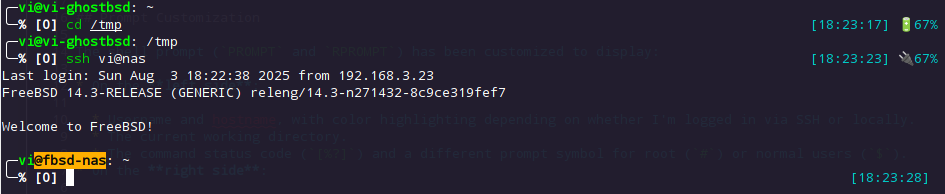
This is powered by two custom functions:
is_local() checks if the session is local or over SSH and applies different color schemes.get_battery() uses acpiconf to fetch battery status and renders an icon + percentage.I use Antidote to manage my Zsh plugins, which are declared in ~/.config/zsh/zsh_plugins.txt. It’s simple and fast plugins manager.
My zsh_plugins.txt is like this:
$ cat .config/zsh/zsh_plugins.txt
zsh-users/zsh-syntax-highlighting          – Highlights command syntax as you type.
zsh-users/zsh-autosuggestions              – Suggests commands based on history.
zsh-users/zsh-history-substring-search     – Allows up/down search through history by typing substrings.
zsh-users/zsh-completions                  – Extra completions for many CLI tools.
To load them, we the following lines in .zshrc:
source $HOME/.config/zsh/antidote/antidote.zsh
antidote load $HOME/.config/zsh/zsh_plugins.txt
Completion system is enabled with compinit.
Case-insensitive tab-completion: zstyle ':completion:*' matcher-list 'm:{a-z}={A-Za-z}'
Completion matches ls coloring: zstyle ':completion:*' list-colors based on LS_COLORS.
Enhanced history:
sharehistory).hist_ignore_dups, etc.).Arrow key bindings allow substring search through history (via plugin and manual key binds):
On FreeBSD, I redefine ls to show colors:
[ "$(uname -s)" = "FreeBSD" ] && alias ls='ls --color'
Colors are enabled with autoload -U colors && colors.
Custom colors in the prompt use 256-color codes to distinguish states (e.g., SSH, user/root).
ZSH_AUTOSUGGEST_HIGHLIGHT_STYLE is customized to use a soft grey:
ZSH_AUTOSUGGEST_HIGHLIGHT_STYLE="fg=#8b9193"
Via the following script I send and synchronize all my machines with the same zsh setup.
I'm sure to have the same "layout" and same behaviour
#/bin/sh

failed() {
    echo "ERROR: Failed to sync $1 to $2"
    exit 1
}

set -x

for host in vi@nas vi@fw1 vi@fw2 vi@mywebserver vi@myhost
do
    rsync -a --delete $HOME/.zshrc $host:.zshrc || failed .zshrc $host
    user=${host%@*}
    ssh $host "chown $user .zshrc"
    rsync -a --delete $HOME/.config/zsh/ $host:.config/zsh/ || failed .config/zsh $host
    ssh $host "chown -R $user .config/zsh"
    ssh $host "rm .config/zsh/zsh_plugins.zsh"
done
Removing the zsh_plugins.zsh forces antidote to recreate is on the target machine.
This setup gives me a responsive and informative terminal experience, especially helpful on battery-powered FreeBSD laptops. The config is portable and modular, easy to evolve or migrate to another machines; even if they are OpenBSD
Since few months I'm using zsh, I'm convinced this the shell which correspond to my needs. My only complain was to not discovered it sooner.
If you have not yet try it, please give a trial to zsh. It will not be the case for 100% of the persons, but It could be that zsh matches your needs.
